By Tony Patton
Lotus has finally shipped Release 5.0, and it looks like it was worth the long wait. With that in mind, let us continue our tour of LotusScript enhancements. This month we will take a look at the brand new NotesReplication class.
The NotesReplication class gives us access to the replication settings for a database. Sadly, it does not grant access to the replication formula.
Replication
Lets take a quick refresher course on replication before exploring the NotesReplication class. Many of you may be familiar with this topic. Even so, you may want to read through this section as a review.
One of the Domino's most useful abilities is replication; you can keep multiple copies of a single database on multiple servers and/or workstations. These copies are called replicas. The replica mechanism gives many different users access to the same information regardless of their location and whether they have a persistent network connection or not. Information in the replicas can be updated or deleted.
Replication is the process of synchronizing (i.e., exchanging the modifications) the information from all of the replicas. Through replication, Notes makes all of the replicas essentially identical -- over time. A replica has the same ID has the original database. This replica ID is used by the system to identify replicas. The replica ID for a database can be viewed in the second tab in the Database Properties info box. Figure A shows the replica ID for a database.
FIGURE A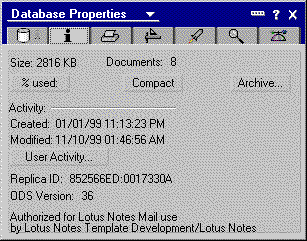
Here's the replica ID for a database. (click for larger image)
A database can be replicated by right clicking on the database icon and selecting replicate. Alternately, you can visit the Replicator tab on the Workspace, select a database from the list, and press the Start button. Figure B shows the replicator page on my laptop.
FIGURE B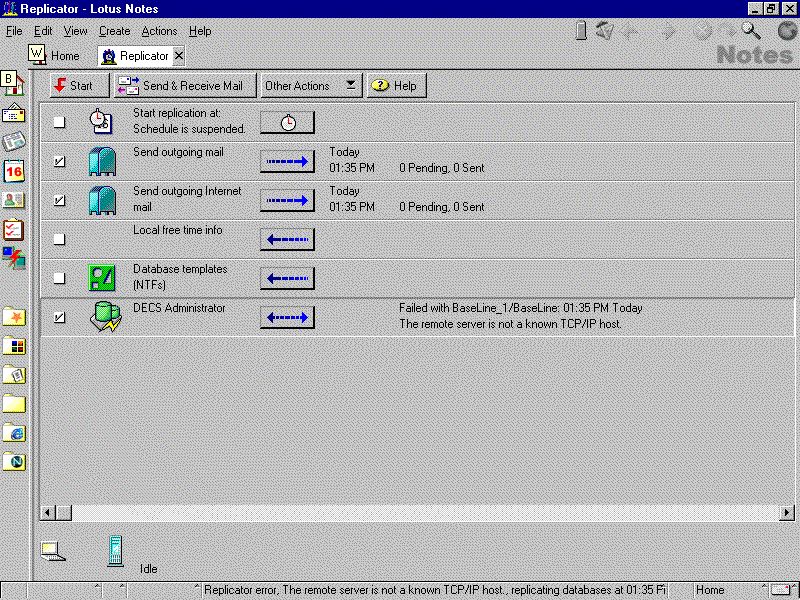
Here's how I've configured my replication options. (click for larger image)
NotesReplication class
While the NotesReplication class does not allow you to start or stop the replication of a database, it does give you access to the various replication settings for it. The following properties exist for the NotesReplication class:
- Abstract: Signals whether large documents should be truncated and attachments removed or not;
- CutoffDate: Today's date minus the cutoff interval;
- CutoffDelete: Signals whether documents older than cutoff date should be deleted or not;
- CutoffInterval: The number of days after which documentss are deleted, if CufoffDelete is set to True;
- Disabled: Signals if replication is disabled or not;
- DoNotBrowse: Signals if the database should not be shown in Open Database box;
- DoNotCatalog: Signals if the database should be listed in Database Catalog;
- HideDesign: Signals if the database design is hidden or not;
- IgnoreDeletes: Signals whether deleted items should be replicated or not;
- IgnoreDestDeletes: Signals whether deleted items from destination database should be replicated or not;
- MultiDBIndex: Signals whether the database can be included in a multidatabase index or not;
- NeverReplicate: Signals if replication is disabled or not;
- NoChronos: Signals whether background agents are disabled or not;
- Priority: The replication priority for the database (Low, Medium, High, or not set).